


Upcoming Events: Auto Vision Summit 2026 | Smart Factory Expo 2026 | Live Demos Available

Computer Vision Defect Detection

Computer Vision Defect Detection for Manufacturing

Automate surface inspection, cosmetic quality checks, and reject decisions at line speed.

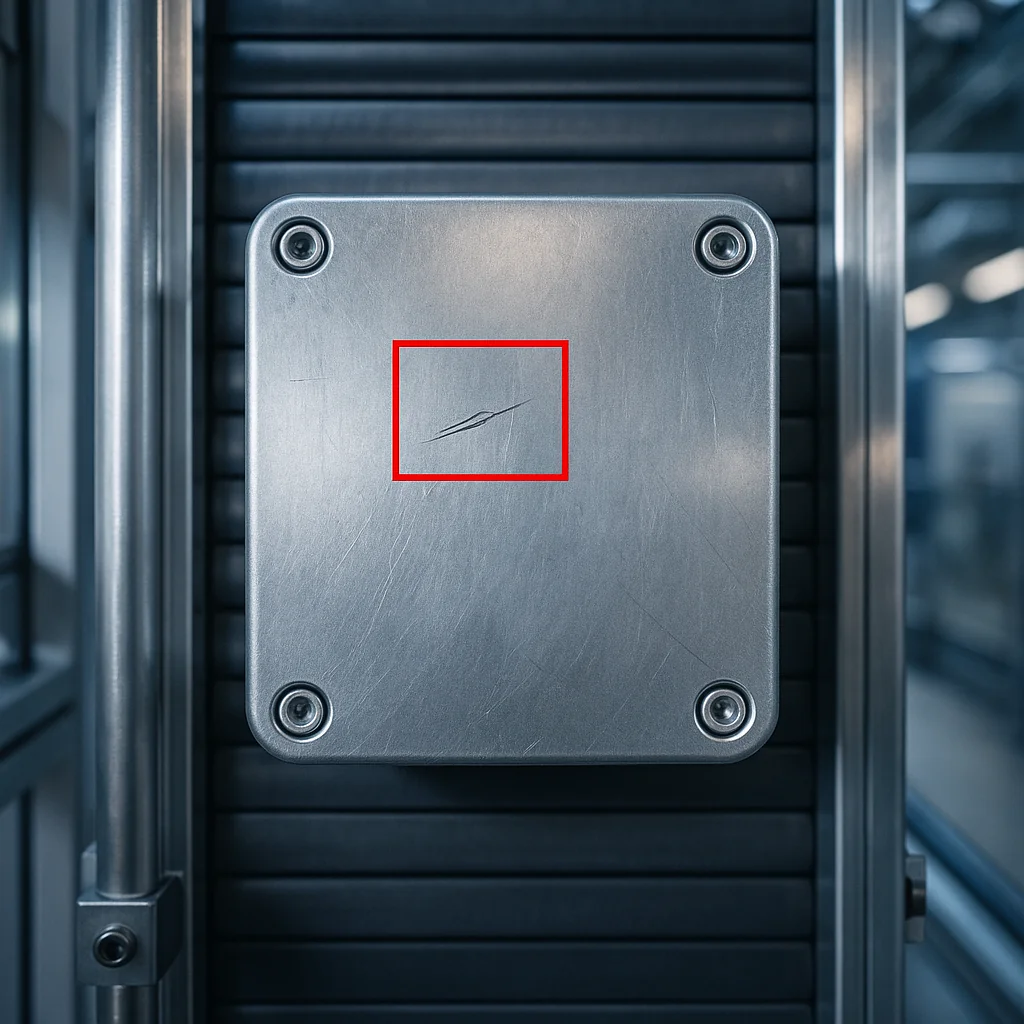
This application is designed for teams searching for computer vision defect detection systems that can catch scratches, dents, cracks, missing material, contamination, print issues, and finish variation before defects reach the customer.

Explore No-Code Platform
Computer vision defect detection system inspecting manufactured parts

Built For Production

Tuned for real line conditions, traceability requirements, and fast operator decisions.

Search Intent

Computer Vision Defect Detection

System Compatibility

Built for real manufacturing conditions

Designed for production lines where vision has to fit into existing cameras, PLCs, controllers, and factory automation standards without forcing a complete hardware reset.

System Compatibility

Connect with GenICam-compliant industrial cameras

Built to work with common machine vision camera ecosystems used across inspection and automation deployments.

BaslerBasler
Allied VisionAllied Vision
BaumerBaumer
HikvisionHikvision

99%+

Defect detection accuracy on trained defect classes

24/7

Inline inspection without operator fatigue

ms

Real-time inference for fast production lines

<2 weeks

Typical pilot deployment timeline

Production Challenge

Why teams search for this solution

Manual visual inspection becomes inconsistent when production scales, part finishes change, or defects appear only under specific lighting angles. Manufacturers usually search for defect detection AI when escape rates, rework, and customer complaints start increasing faster than teams can control.

Solution Approach

How Orama deploys the application

Orama combines camera setup, image capture strategy, defect annotation, model training, threshold tuning, and edge deployment into one production workflow. The result is a system that separates good parts from non-conforming parts with traceable evidence and stable performance on the shop floor.

Typical Project Flow

  • Imaging setup and data capture review
  • Model tuning around line variation
  • Pass or fail logic and deployment

Capabilities

What This Application Does

  • Detect scratches, dents, chips, cracks, porosity, coating damage, print defects, and contamination on complex part surfaces.
  • Inspect parts in real time directly on conveyors, rotary tables, test rigs, or manual inspection stations.
  • Support multi-camera views when a single angle is not enough to capture hidden or reflective defects.
  • Generate pass or fail decisions with image evidence for quality teams, audits, and root cause analysis.

Deployment Workflow

How Deployment Works

  • Capture representative good and defective part images under controlled production lighting.
  • Label defect regions and group them by defect family, severity, or reject condition.
  • Train and validate the model on real production variation including finish, orientation, and lot changes.
  • Deploy the model to the line, tune decision thresholds, and connect outputs to reject systems or dashboards.

Use Cases

Common Production Use Cases

  • Automotive painted surface inspection for scratches, dents, and finish defects.
  • Electronics and PCB inspection for solder, placement, and component surface defects.
  • Packaging quality inspection for seal damage, cap defects, label defects, and contamination.
  • Machined component inspection for burrs, edge damage, missing holes, and surface anomalies.

Business Outcomes

Operational Outcomes

  • Lower defect escape rates and stronger quality consistency across shifts.
  • Reduced dependence on manual inspection for repetitive and high-volume checks.
  • Faster containment when a process drift creates a new defect pattern.
  • Improved traceability with stored images linked to batch, station, or serial history.

Frequently Asked Questions

Questions buyers usually ask before deployment

What types of defects can a computer vision defect detection system find?

It can be trained for surface defects, assembly defects, contamination, print issues, dimensional anomalies visible in images, and many other visual non-conformities as long as the imaging setup captures them reliably.

Can this work on reflective or low-contrast parts?

Yes, but success depends heavily on optics and lighting. We usually solve this with the right illumination angle, enclosure design, and sometimes multi-view image capture before model training starts.

How much data is needed to start a pilot?

A pilot often starts with a focused dataset of good parts and the main reject categories. The exact number depends on defect variability, but the goal is to cover real production variation rather than collect a massive dataset too early.

Can the system trigger automatic rejection on the line?

Yes. The inspection output can be integrated with PLCs, reject mechanisms, stack lights, HMIs, or MES systems so the AI result becomes part of the production control loop.

Next Step

Need a tailored application page for your exact inspection problem?

We can adapt the same platform for your product geometry, lighting, line speed, traceability rules, and reporting needs without forcing your team into a generic workflow.

View All Applications

Project Fit

  • Single station pilots or full multi-line rollouts
  • Camera, PLC, and edge hardware aligned to your plant setup
  • Traceability, dashboards, and pass or fail logic tailored to the line